
Hyundai i30 (PD): Driving your vehicle / Intelligent speed limit warning (ISLW) system
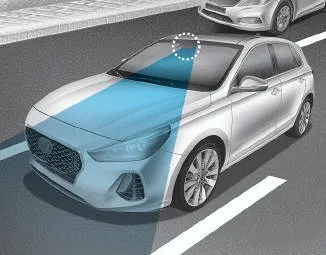
The ISLW displays the speed limit information and overtaking restriction through the instrument cluster and the navigation. The ISLW detects the traffic signs through a front view camera, which is attached on the upper part of the inner front windscreen.
The ISLW also utilises the navigation and vehicle information to display the speed limit information.
WARNING
- Inteligent Speed Limit Warning (ISLW) system is only a supplemental system and is not always able to correctly display speed limits and overtaking restrictions.
- The driver still holds the responsibility not to exceed the maximum speed limit.
- Do not install any accessories and stickers. Do not tint the front windscreen, especially near the rearview mirror.
- The ISLW detects the traffic signs through the camera to display the speed limit information. Therefore, the ISLW may not properly operate, when it is hard to detect the traffic signs. For further details, please refer to the "Limitations of the system".
- Pay extreme caution to keep the camera sensor out of water.
- Do not arbitrarily disassemble the camera assembly, nor apply any impact on the camera assembly.
- Do not locate any reflective objects (i.e. white paper, mirror) over the dashboard. Any light reflection may cause a malfunction system.
- The system is not available in all countries.
Information
We recommend that you have the system checked by a HYUNDAI authorised repairer when:
- The windscreen glass is replaced.
- The camera or related parts are repaired or removed.
The sensor may be limited when: The pedestrian is not fully detected by the camera recognition system, for example, if the pedestrian is leaning over or is not fully walking upright The pedestrian is moving very quickly or appears abruptly in the camera detection area The pedestrian is wearing clothing that easily blends into the background, making it difficult to be detected by the camera recognition system The outside lighting is too bright (e.
System setting The driver can activate the Speed Limit Warning by selecting 'User Settings → Driver assistance → Intelligent Speed Limit Warning'.
Other information:
Hyundai i30 (PD) 2018-2024 Owner's Manual: Smart Cruise Control speed
To set Smart Cruise Control speed 1. Push the button on the steering wheel to turn the system on. The cruise () indicator will illuminate. 2. Accelerate to the desired speed. The Smart Cruise Control speed can be set as follows: 20 mph (30 km/h)~110 mph (180 km/h) : when there is no vehicle in front 0 mph (0 km/h)~110
Hyundai i30 (PD) 2018-2024 Owner's Manual: Washer fluid
Checking the washer fluid level Check the fluid level in the washer fluid reservoir and add fluid if necessary. Plain water may be used if washer fluid is not available. However, use washer solvent with antifreeze characteristics in cold climates to prevent freezing.
Categories
- Manuals Home
- Hyundai i30 Owners Manual
- Your vehicle at a glance
- Engine coolant
- Trip computer
- New on site
- Most important about car
