
Hyundai i30 (PD): Tyre pressure monitoring system (TPMS) (Type A) / Check tyre pressure
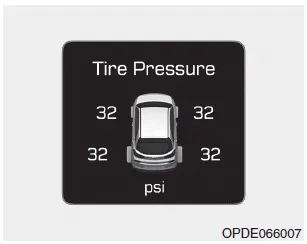
- You can check the tyre pressure in the Assist mode on the cluster. Refer to the "LCD Display Modes" in chapter 3.
- Tyre pressure is displayed after a few minutes of driving after initial engine start up.
- If tyre pressure is not displayed when the vehicle is stopped, "Drive to display" message will appear. After driving, check the tyre pressure.
- The displayed tyre pressure values may differ from those measured with a tyre pressure gauge.
- You can change the tyre pressure unit in the User Settings mode on the instrument cluster.
(1) Low Tyre Pressure Telltale/ TPMS Malfunction Indicator (2) Low tyre pressure position telltale and tyre pressure telltale (Shown on the LCD display)
WARNING Over-inflation or under-inflation can reduce tyre life, adversely affect vehicle handling, and lead to sudden tyre failure that may cause loss of vehicle control resulting in an accident.
Other information:
Hyundai i30 (PD) 2018-2024 Owner's Manual: To adjust the sensitivity of Smart Cruise Control
The sensitivity of vehicle speed when following the front vehicle to maintain the set distance can be adjusted. Go to the 'User Settings → Driving Assist → Smart Cruise Control Speed → Slow/Normal/ Fast' on the LCD display. You may select one of the three stages you prefer.
Hyundai i30 (PD) 2018-2024 Owner's Manual: Notes on the safe use of the Tyre Mobility Kit
Park your car at the side of the road so that you can work with the Tyre Mobility Kit away from moving traffic. To be sure your vehicle will not move, even when you're on fairly level ground, always set your parking brake. Only use the Tyre Mobility Kit for sealing/ inflation passenger car tyres.
Categories
- Manuals Home
- Hyundai i30 Owners Manual
- Warning and indicator lights
- Scheduled maintenance services
- Rear combination lamp bulb replacement
- New on site
- Most important about car
