
Hyundai i30 (PD): If you have a flat tyre (with spare tyre) / Jack label
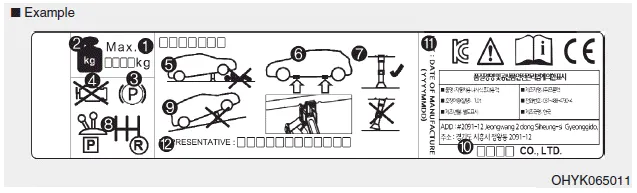
The actual Jack label in the vehicle may differ from the illustration.
For more detailed specifications, refer to the label attached to the jack.
1. Model Name
2. Maximum allowable load
3. When using the jack, set your
parking brake.
4. When using the jack, stop the
engine.
5. Do not get under a vehicle that is
supported by a jack.
6. The designated locations under
the frame
7. When supporting the vehicle, the
base plate of jack must be vertical
under the lifting point.
8. Shift into Reverse gear on vehicles
with manual transmission or move
the shift lever to the P position on
vehicles with automatic transmission/
dual clutch transmission.
9. The jack should be used on firm
level ground.
10. Jack manufacture
11. Production date
12. Representative company and
address
WARNING A vehicle can slip or roll off of a jack causing serious injury or death to you or those nearby. Take the following safety precautions: Do not get under a vehicle that is supported by a jack.
â– Type A â– Type B For safe operation, carefully read and follow the instructions in this manual before use. (1) Compressor (2) Sealant bottle The Tyre Mobility Kit is a temporary fix to the tyre and we recommend that the system be inspected by a HYUNDAI authorised repairer.
Other information:
Hyundai i30 (PD) 2018-2024 Owner's Manual: Tyre rotation
To equalize tread wear, HYUNDAI recommends that the tyres be rotated every 7,500 miles (12,000 km) or sooner if irregular wear develops. During rotation, check the tyres for correct balance. When rotating tyres, check for uneven wear and damage.
Hyundai i30 (PD) 2018-2024 Owner's Manual: Exhaust emission control system
The Exhaust Emission Control System is a highly effective system which controls exhaust emissions whilst maintaining good vehicle performance. Vehicle modifications This vehicle should not be modified. Modification of your vehicle could affect its performance, safety or durability and may even violate governmental safety and emissio
Categories
- Manuals Home
- Hyundai i30 Owners Manual
- Specifications & Consumer information
- LKA system operation
- Drive mode integrated control system
- New on site
- Most important about car
