
Hyundai i30 (PD): Interior features / Power outlet
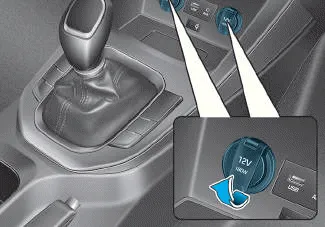
■Front • Type A

■Front • Type B
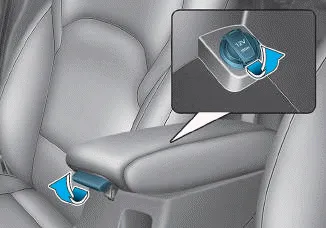
â– Centre

â– Rear
The power outlet is designed to provide power for mobile telephones or other devices designed to operate with vehicle electrical systems. The devices should draw less than 180 W(Watt) with the engine running.
WARNING
Avoid electrical shocks. Do not place your fingers or foreign objects (pin, etc.) into a power outlet or touch the power outlet with a wet hand.
NOTICE
To prevent damage to the Power Outlets :
- Use the power outlet only when the engine is running and remove the accessory plug after use. Using the accessory plug for prolonged periods of time with the engine off could cause the battery to discharge.
- Only use 12V electric accessories which are less than 180 W(Watt) in electric capacity.
- Adjust the air-conditioner or heater to the lowest operating level when using the power outlet.
- Close the cover when not in use.
- Some electronic devices can cause electronic interference when plugged into a vehicle’s power outlet.These devices may cause excessive audio static and malfunctions in other electronic systems or devices used in your vehicle.
- Push the plug in as far as it will go. If good contact is not made, the plug may overheat and the fuse may open.
- Plug in battery equipped electrical/ electronic devices with reverse current protection. The current from the battery may flow into the vehicle's electrical/electronic system and cause system malfunction.
To use a sunvisor, pull it downward. To use a sunvisor for a side window, pull it downward, unsnap it from the bracket (1) and swing it to the side (2).
â– Type A â– Type B To use the cigarette lighter, the ignition switch must be in the ACC or ON position. Push the cigarette lighter all the way into its socket.
Other information:
Hyundai i30 (PD) 2018-2024 Owner's Manual: To adjust the sensitivity of Smart Cruise Control
The sensitivity of vehicle speed when following the front vehicle to maintain the set distance can be adjusted. Go to the 'User Settings → Driving Assist → Smart Cruise Control Speed → Slow/Normal/ Fast' on the LCD display. You may select one of the three stages you prefer.
Hyundai i30 (PD) 2018-2024 Owner's Manual: Tyre chains
Since the sidewalls of radial tyres are thinner than other types of tyres, they may be damaged by mounting some types of tyre chains on them. Therefore, the use of snow tyres is recommended instead of tyre chains. Do not mount tyre chains on vehicles equipped with aluminium wheels; if unavoidable use a wire or fabric type snow ch
Categories
- Manuals Home
- Hyundai i30 Owners Manual
- Shift-lock system. Shift-lock release
- Low tyre pressure telltale
- Fuses
- New on site
- Most important about car
