
Hyundai i30 (PD): Smart key / Battery replacement
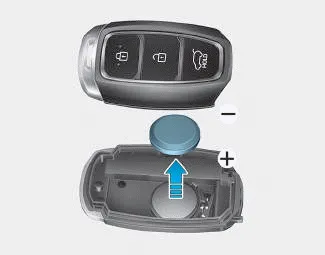
If the Smart Key is not working properly, try replacing the battery with a new one.
Battery Type: CR2032
To replace the battery:
1. Remove the mechanical key.
2. Use a slim tool to pry open the rear cover of the smart key.
3. Remove the old battery and insert the new battery. Make sure the battery position is correct.
4. Reinstall the rear cover of the smart key.
If you suspect your smart key might have sustained some damage, or you feel your smart key is not working correctly, it is recommended that you contact a HYUNDAI authorised repairer.
Information
An inappropriately disposed battery can be harmful to the environment and human health. Dispose of the battery according to your local law(s) and or regulations.
The smart key may not work if any of the following occur: The smart key is close to a radio transmitter such as a radio station or an airport which can interfere with normal operation of the smart key.
The immobiliser system protects your vehicle from theft. If an improperly coded key (or other device) is used, the engine’s fuel system is disabled.
Other information:
Hyundai i30 (PD) 2018-2024 Owner's Manual: Using the Tyre Mobility Kit
CAUTION Detach the speed restriction label (1) from the sealant bottle (2), and place it in a highly visible place inside the vehicle such as on the steering wheel to remind the driver not to drive too fast. 1. Shake the sealant bottle (2).
Hyundai i30 (PD) 2018-2024 Owner's Manual: Emergency commodity
Your vehicle is equipped with emergency commodities to help you respond to emergency situation. Fire extinguisher If there is small fire and you know how to use the fire extinguisher, follow these steps carefully. 1. Pull out the safety pin at the top of the extinguisher that keeps the handle from being accidentally pressed.
Categories
- Manuals Home
- Hyundai i30 Owners Manual
- Specifications & Consumer information
- Low tyre pressure telltale
- Fuses
- New on site
- Most important about car
