
Hyundai i30 (PD): Blind-spot collision warning (BCW) system / BCW
Operating conditions
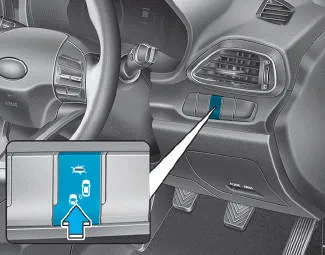
To operate:
Press the BCW switch with the Ignition switch in the ON position.
The indicator on the BCW switch will illuminate. When the vehicle speed exceeds 20 mph (30 km/h), the system will be activated.
To cancel:
Press the BCW switch again. The indicator on the switch will go off.
When the system is not used, turn the system off by turning off the switch.
Information
- If the vehicle is turned off then on again, the BCW system returns to the previous state.
- When the system is turned on, the warning light will illuminate for 3 seconds on the outside rearview mirror.
The function will activate when:
1. The system is on.
2. The vehicle speed is above approximately 20 mph (30 km/h).
3. An oncoming vehicle is detected in the blind spot area.
First stage alert
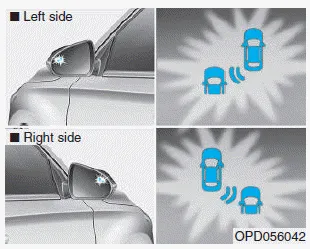
If a vehicle is detected within the boundary of the system, a warning light will illuminate on the outside rearview mirror.
Once the detected vehicle is no longer within the blind spot area, the warning will turn off depending on the driving conditions of the vehicle.
Second stage alert
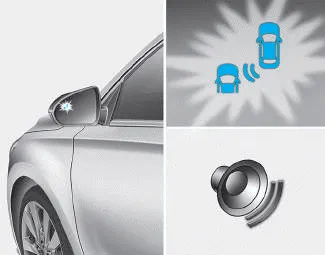
â– Left side
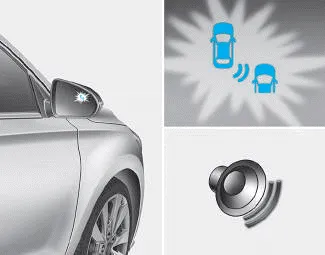
â– Right side
A warning chime to alert the driver will activate when:
1. A vehicle has been detected in the blind spot area by the radar system (the warning light will illuminate on the outside rearview mirror) AND
2. The turn signal is applied (same side as where the vehicle is being detected).
When this alert is activated, the warning light on the outside rearview mirror will also blink.
If you turn off the turn signal indicator, the warning chime will be deactivated. When this alert is activated, the warning light on the outside rearview mirror will also blink. And a warning chime will sound. If you turn off the turn signal indicator, the second stage alert will be deactivated.
Once the detected vehicle is no longer within the blind spot area, the warning will turn off according to the driving conditions of the vehicle.
• The warning chime may be deactivated.
- To deactivate the warning chime:
Go to the "User Settings → Driver
Assistance and deselect Blind-spot
Collision Warning sound" on the
LCD display.
- To activate the warning chime:
Go to the "User Settings → Driver
Assistance and select Blind-spot
Collision Warning sound" on the
LCD display.
Information
The warning chime function helps alert the driver. Deactivate this function only when it is necessary.
Refer to "User settings mode" in chapter 3 for more details.
[A] : Blind spot area [B] : Closing at high speed The Blind-spot Collision Warning (BCW) system uses radar sensors in the rear bumper to monitor and warn the driver of an approaching vehicle in the driver's blind spot area.
The Rear Cross-Traffic Collision warning function monitors approaching cross traffic from the left and right side of the vehicle when your vehicle is in reverse.
Other information:
Hyundai i30 (PD) 2018-2024 Owner's Manual: Engine compartment
1. Engine coolant reservoir/ Engine coolant cap 2.Brake/clutch fluid reservoir 3. Air cleaner 4. Engine oil dipstick 5. Engine oil filler cap 6.Windscreen washer fluid reservoir 7.Fuse box 8. Battery 1. Engine coolant reservoir 2.
Hyundai i30 (PD) 2018-2024 Owner's Manual: Engine oil
Checking the engine oil level 1. Be sure the vehicle is on level ground. 2. Start the engine and allow it to reach normal operating temperature. 3. Turn the engine off and wait for a few minutes (about 5 minutes) for the oil to return to the oil pan.
Categories
- Manuals Home
- Hyundai i30 Owners Manual
- Shift-lock system. Shift-lock release
- Warning and indicator lights
- Your vehicle at a glance
- New on site
- Most important about car
