
Hyundai i30 (PD): Convenient features of your vehicle / Driver assist system
Rear View Monitor
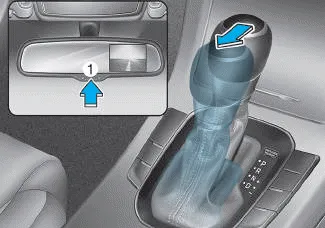
â– Type A
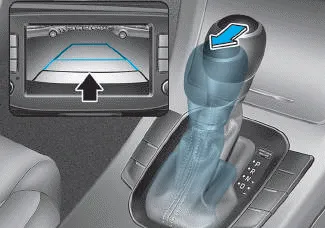
â– Type B
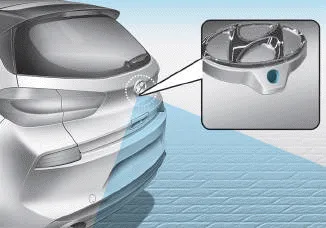
â– 5 Door
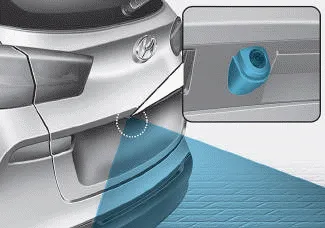
â– Wagon
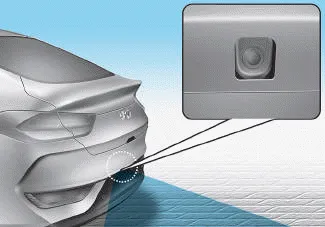
â– Fastback
The Rear View Monitor will activate when the engine is running and the shift lever is in the R (Reverse) position.
This is a supplemental system that shows behind the vehicle through the mirror or navigation display whilst backing-up.
â– Type A
The Rear View Monitor can be turned off by pressing the ON/OFF button (1) when the Rear View Monitor is activated. Press the ON/OFF button (1) once more to turn on the Rear View Monitor when the engine is running and the shift lever is in R (Reverse).
WARNING
The Rear View Monitor display is not a safety device. It only serves to assist the driver in identifying objects directly behind the middle of the vehicle. The camera does NOT cover the complete area behind the vehicle.
WARNING
- Never rely solely on the Rear View Monitor display when backing-up.
- ALWAYS look around your vehicle to make sure there are no objects or obstacles before moving the vehicle in any direction to prevent a collision.
- Always pay close attention when the vehicle is driven close to objects, particularly pedestrians, and especially children.
NOTICE
- Do not spray the camera or its surrounding area directly with a high pressure washer. Shock applied from high pressure water may cause the device to not operate normally.
- Do not use any cleanser containing acid or alkaline detergents when cleaning the lens. Use only a mild soap or neutral detergent, and rinse thoroughly with water.
Information
Always keep the camera lens clean. The camera may not work normally if the lens is covered with dirt, water or snow.
Windscreen wipers. AUTO (Automatic) control Operates as follows when the ignition switch is turned ON. : For a single wiping cycle, move the lever down and release it.
The Parking Distance Warning (Reverse) system assists the driver during reverse movement of the vehicle by chiming if any object is sensed within the distance of 120 cm (50 inches) behind the vehicle.
Other information:
Hyundai i30 (PD) 2018-2024 Owner's Manual: Sensor to detect distance to the vehicle ahead
The Smart Cruise Control uses a sensor to detect distance to the vehicle ahead. Warning message SCC (Smart Cruise Control) disabled. Radar blocked When the sensor lens cover is blocked with dirt, snow, or debris, the Smart Cruise Control System operation may stop temporarily.
Hyundai i30 (PD) 2018-2024 Owner's Manual: Rear fog lamp
1. Loosen the pin-type retainers and screws of the rear wheel guard and then detach it from the rear bumper. 2. Reach your hand into the back of the rear bumper. 3. Remove the socket from the housing by turning the socket counterclockwise until the tabs on the socket align with the slots of the housing.
Categories
- Manuals Home
- Hyundai i30 Owners Manual
- Specifications & Consumer information
- Low tyre pressure telltale
- Headlamp, static bending lamp, position lamp, turn signal lamp and daytime running light bulb replacement
- New on site
- Most important about car
