
Hyundai i30 (PD): Driving your vehicle / Smart cruise control (SCC) with stop & go system

➀ Cruise indicator
� Set speed
âž‚ Vehicle-to-vehicle distance
To see the SCC screen on the LCD
display in the cluster, select ASSIST
mode ( ). For more information,
refer to “LCD Display Modes� in
chapter 3.
). For more information,
refer to “LCD Display Modes� in
chapter 3.
The Smart Cruise Control System allows you to program the vehicle to maintain constant speed and minimum distance between the vehicle ahead.
The Smart Cruise Control System will automatically adjust your vehicle speed to maintain your programmed speed and following distance without requiring you to depress the accelerator or brake pedals.
WARNING
For your safety, please read the owner's manual before using the Smart Cruise Control system.
WARNING
The Smart Cruise Control System is not a substitute for safe driving practices, but a convenience function only. It is the responsibility of the driver to always check the speed and distance to the vehicle ahead.
WARNING
Take the following precautions :
- Always set the vehicle speed under the speed limit in your country.
- If the Smart Cruise Control is
left on, (cruise (
 )
indicator light in the instrument
cluster is illuminated)
the Smart Cruise Control can
be activated unintentionally.
Keep the Smart Cruise
Control System off (cruise
(
)
indicator light in the instrument
cluster is illuminated)
the Smart Cruise Control can
be activated unintentionally.
Keep the Smart Cruise
Control System off (cruise
( ) indicator light
OFF) when the Smart Cruise
Control is not in use, to avoid
inadvertently setting a speed.
) indicator light
OFF) when the Smart Cruise
Control is not in use, to avoid
inadvertently setting a speed. - Use the Smart Cruise Control System only when travelling on open highways in good weather.
- Do not use the Smart Cruise
Control when it may not be
safe to keep the vehicle at a
constant speed:
- When driving in heavy traffic or when traffic conditions make it difficult to drive at a constant speed
- When driving on rainy, icy, or snow-covered roads
- When driving on a steep downhill or uphill
- When driving in windy areas
- When driving in parking lots
- When driving near crash barriers
- When driving on a sharp curve
- When driving with limited view (possibly due to bad weather, such as fog, snow, rain or sandstorm)
- When the vehicle sensing ability decreases due to vehicle modification resulting level difference of the vehicle's front and rear - Unexpected situations may lead to possible accidents. Pay attention continuously to road conditions and driving even when the smart cruise control system is being operated.
Smart cruise control switch
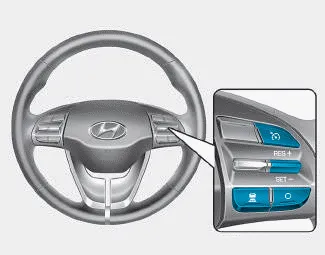
O : Cancels cruise control operation.
 : Turns cruise control system on
or off.
: Turns cruise control system on
or off.
RES+: Resumes or increases cruise control speed.
SET-: Sets or decreases cruise control speed.
 : Sets vehicle-to-vehicle
distance.
: Sets vehicle-to-vehicle
distance.

Information
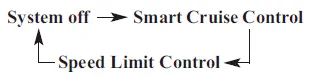
First, switch the mode to Smart
Cruise Control by pressing the  button if equipped with the Speed
Limit Control System.
button if equipped with the Speed
Limit Control System.
The mode changes, as below, whenever
the  button is pressed.
- Smart Cruise Control speed
- Smart Cruise Control Vehicleto- Vehicle Distance
- Sensor to detect distance to the vehicle ahead
- To adjust the sensitivity of Smart Cruise Control
- To convert to Cruise Control mode
- Limitations of the system
Cruise Control operation 1. CRUISE indicator 2. SET indicator The Cruise Control system allows you to drive at speeds above 20 mph (30 km/h) without depressing the accelerator pedal.
To set Smart Cruise Control speed 1. Push the button on the steering wheel to turn the system on. The cruise () indicator will illuminate.
Other information:
Hyundai i30 (PD) 2018-2024 Owner's Manual: Special driving conditions
Hazardous driving conditions When hazardous driving elements are encountered such as water, snow, ice, mud and sand, take the following precautions: Drive cautiously and maintain a longer braking distance. Avoid abrupt braking or steering.
Hyundai i30 (PD) 2018-2024 Owner's Manual: TPMS (Tyre Pressure Monitoring System) malfunction indicator
The TPMS malfunction indicator will illuminate after it blinks for approximately one minute when there is a problem with the Tyre Pressure Monitoring System. We recommend that the system be checked by a HYUNDAI authorised repairer. NOTICE If there is a malfunction with the TPMS, the low tyre pressure position telltale will not
Categories
- Manuals Home
- Hyundai i30 Owners Manual
- Your vehicle at a glance
- Warning and indicator lights
- Speed Limiter Indicator Light. SPORT Mode Indicator Light. ECO Mode Indicator Light
- New on site
- Most important about car
