
Hyundai i30 (PD): Driving your vehicle / Lane departure warning (LDW) system
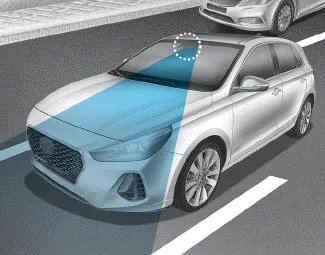
This Lane Departure Warning (LDW) System detects the lane with the sensor at the front windscreen and warns you when your vehicle leaves the lane.
WARNING
The Lane Departure Warning System is not a substitute for safe driving practices, but a convenience function only. It is the responsibility of the driver to always be aware of the surrounding and steer the vehicle.
WARNING
Take the following precautions when using the Lane Departure Warning (LDW) System:
- ALWAYS check your surroundings and the road conditions before changing lanes. The LDW system does not control the vehicle to change lanes or to stay in the current lane.
- Do not make abrupt manoeuvres or turn the steering wheel suddenly if the LDW system alerts you that the vehicle is departing from the lane.
- If the camera recognition system does not properly detect the lane, the LDW system may not notify you if the vehicle departs from the lane.
- The LDW system does not operate until the vehicle speed reaches approximately 37 mph (60 km/h).
- Do not disassemble the LDW system camera temporarily to tint the window or attach any types of coatings and accessories. If you disassemble the camera and assemble it again, we recommend that you take your vehicle to a HYUNDAI authorised repairer and have the system checked for calibration.
- When you replace the windscreen glass or LDW system camera, we recommend that you take your vehicle to a HYUNDAI authorised repairer and have the system checked for calibration.
- Do not spray water or any type of liquid near the camera. The system may become damaged.
- Do not attempt to repair the LDW system camera and do not remove any parts.
- Do not place objects that reflect light on the dashboard whilst driving.
- Do not place any accessories near the inside rearview mirror.
- You may not hear a warning sound of LDW system because of the excessive audio sound.
- The operation of the LDW system may be affected by several factors including environmental conditions that affect the ability of the camera to detect the lanes in front of you. It is the responsibility of the driver to pay careful attention to the roadway and to maintain the vehicle in its intended lane at all times.
The driver can change LKA to the Lane Departure Warning (LDW) system or change the LKA system mode between Standard LKA and Active LKA from the LCD display.
To activate/deactivate the LDW system: With the ignition switch in the ON position, press the LDW system button located on the instrument panel on the lower left hand side of the driver.
Other information:
Hyundai i30 (PD) 2018-2024 Owner's Manual: Jack and tools
(1) Jack handle (2) Jack (3) Wheel nut wrench The jack, jack handle, and wheel nut wrench are stored in the luggage compartment under the luggage box cover. The jack is provided for emergency tyre changing only. Turn the winged hold down bolt counterclockwise to remove the spare tyre.
Hyundai i30 (PD) 2018-2024 Owner's Manual: Emergency commodity
Your vehicle is equipped with emergency commodities to help you respond to emergency situation. Fire extinguisher If there is small fire and you know how to use the fire extinguisher, follow these steps carefully. 1. Pull out the safety pin at the top of the extinguisher that keeps the handle from being accidentally pressed.
Categories
- Manuals Home
- Hyundai i30 Owners Manual
- Brake/clutch fluid
- Speed Limiter Indicator Light. SPORT Mode Indicator Light. ECO Mode Indicator Light
- Maintenance services
- New on site
- Most important about car
