
Hyundai i30 (PD): Driving your vehicle / Speed limit control system
Speed Limit Control operation
You can set the speed limit when you do not want to drive over a specific speed.
If you drive over the preset speed limit, the warning system operates (set speed limit will blink and chime will sound) until the vehicle speed returns within the speed limit.
Information
Whilst speed limit control is in operation, the cruise control system cannot be activated.
Speed limit control switch
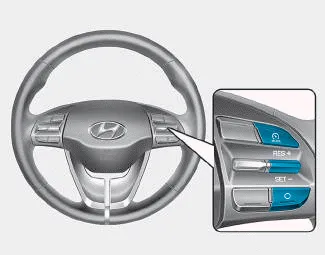
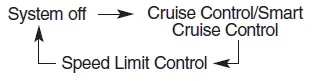
 : Changes mode between cruise
control/smart cruise control
system and speed limit control
system.
: Changes mode between cruise
control/smart cruise control
system and speed limit control
system.
RES+: Resumes or increases speed limit control speed.
SET-: Sets or decreases speed limit control speed.
O: Cancels set speed limit.
To set speed limit

1. Press the  button to turn the
system on. The speed limit indicator
in the instrument cluster will
illuminate.
button to turn the
system on. The speed limit indicator
in the instrument cluster will
illuminate.
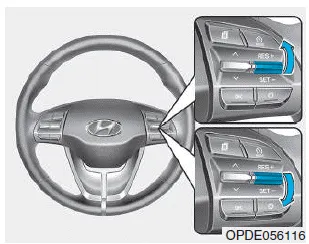
2. Push the toggle switch down (SET-).
3. • Push the toggle switch up (RES+) or down (SET-), and release it at the desired speed.
• Push the toggle switch up (RES+) or down (SET-) and hold it. The speed will increase or decrease by 3 mph (5 km/h).
The set speed limit will display on the instrument cluster.
If you would like to drive over the preset speed limit when you depress the accelerator pedal less than approximately 50%, the vehicle speed will maintain within speed limit.
However if you depress the accelerator pedal more than approximately 70%, you can drive over the speed limit. Then the set speed limit will blink and chime will sound until you return the vehicle speed within the speed limit.
To turn off the speed limit control, do one of the following:
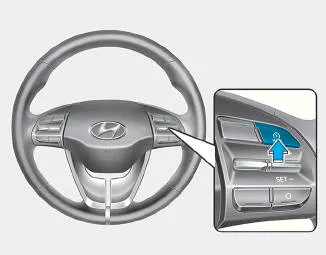
- Press the
 button.
 - If you press O (cancel) button once, the set speed limit will cancel, but it will not turn the system off. If you wish to resume the speed limit, push the +RES or SET- toggle switch on your steering wheel to your desired speed.
The Driver Attention Warning (DAW) system displays the condition of the driver's fatigue level and inattentive driving practices. System setting and activation System setting The Driver Attention Warning (DAW) system is set to be in the OFF position, when your vehicle is first delivered to you from the factory.
Cruise Control operation 1. CRUISE indicator 2. SET indicator The Cruise Control system allows you to drive at speeds above 20 mph (30 km/h) without depressing the accelerator pedal.
Other information:
Hyundai i30 (PD) 2018-2024 Owner's Manual: Battery
WARNING To prevent SERIOUS INJURY or DEATH to you or bystanders, always follow these precautions when working near or handling the battery: Always read and follow instructions carefully when handling a battery. Wear eye protection designed to protect the eyes from acid splashes.
Hyundai i30 (PD) 2018-2024 Owner's Manual: Interior care
Interior general precautions Prevent chemicals such as perfume, cosmetic oil, sun cream, hand cleaner and air freshener from contacting the interior parts because they may cause damage or discoloration. If they do contact the interior parts, wipe them off immediately.
Categories
- Manuals Home
- Hyundai i30 Owners Manual
- Engine coolant
- Specifications & Consumer information
- Low tyre pressure telltale
- New on site
- Most important about car
