
Hyundai i30 (PD): Instrument cluster / Instrument cluster control
Instrument panel illumination
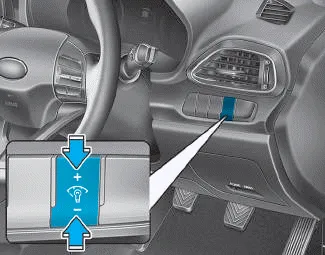
When the vehicle's position lights or headlamps are on, press the illumination control button to adjust the brightness of the instrument panel illumination.
When pressing the illumination control button, the interior switch illumination intensity is also adjusted.
WARNING
Never adjust the instrument cluster whilst driving. This could result in loss of control and lead to an accident that may cause death, serious injury, or vehicle damage.
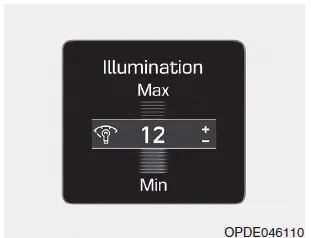
- The brightness of the instrument panel illumination is displayed.
- If the brightness reaches the maximum or minimum level, an alarm will sound.
â– Type A â– Type B 1. Tachometer 2. Speedometer 3. Engine coolant temperature gauge 4. Fuel gauge 5.Warning and indicator lights 6. LCD display (including Trip computer)
Speedometer The speedometer indicates the speed of the vehicle and is calibrated in kilometers per hour (km/h) and/or miles per hour (MPH). Tachometer The tachometer indicates the approximate number of engine revolutions per minute (rpm).
Other information:
Hyundai i30 (PD) 2018-2024 Owner's Manual: Smart Cruise Control speed
To set Smart Cruise Control speed 1. Push the button on the steering wheel to turn the system on. The cruise () indicator will illuminate. 2. Accelerate to the desired speed. The Smart Cruise Control speed can be set as follows: 20 mph (30 km/h)~110 mph (180 km/h) : when there is no vehicle in front 0 mph (0 km/h)~110
Hyundai i30 (PD) 2018-2024 Owner's Manual: Front fog lamp
â– Type A â– Type B 1. Loosen the pin-type retainers of the under cover and then remove the undercover. 2. Reach your hand into the back of the front bumper. 3. Disconnect the power connector from the socket. 4. Remove the bulb-socket from the housing by turning the socket counterclockwise until the tabs on the socket align
Categories
- Manuals Home
- Hyundai i30 Owners Manual
- Engine coolant
- Your vehicle at a glance
- Exhaust System (DPF) Warning Light. Glow Indicator Light
- New on site
- Most important about car
