
Hyundai i30 (PD): Interior features / Cargo security screen (wagon)
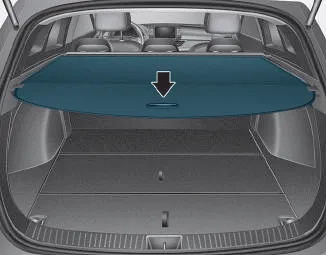
Use the cargo security screen to hide items stored in the cargo area.
NOTICE
Since the cargo security screen may be damaged or malformed, do not put luggage on it when it is used.
WARNING
- Do not place objects on the cargo security screen. Such objects may be thrown about inside the vehicle and possibly injure vehicle occupants during an accident or when braking.
- Never allow anyone to ride in the luggage compartment. It is designed for luggage only.
- Maintain the balance of the vehicle and locate the weight as forward as possible.
To use the cargo security screen
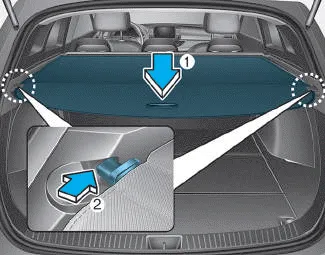
1. Pull the cargo security screen towards the rear of the vehicle by the handle (1).
2. Insert the guide pin into the guide (2).
NOTICE
Pull out the cargo security screen with the handle in the centre to prevent the guide pin from falling out of the guide.
When the cargo security screen is not in use:
1. Pull the cargo security screen back and down to release it from the guides.
2. The cargo security screen will automatically slide back in.
NOTICE
The cargo security screen may not automatically slide back in if it is not fully pulled out. Pull it out completely before letting it go.
To remove the cargo security screen
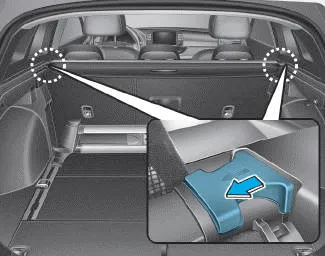
1. Push in the guide pin.
2. Whilst pushing the guide pin, pull out the cargo security screen.
Your vehicle is equipped with a barrier net. When you load some cargoes on the rear seat or rear cargo area, you must install the barrier net behind front or rear seatback.
The luggage rail system may help prevent the luggage from rolling around in the luggage compartment. Build in segmentation bar Put both pillars (A) of the segmentation bar on the rail openings.
Other information:
Hyundai i30 (PD) 2018-2024 Owner's Manual: Using the Tyre Mobility Kit
CAUTION Detach the speed restriction label (1) from the sealant bottle (2), and place it in a highly visible place inside the vehicle such as on the steering wheel to remind the driver not to drive too fast. 1. Shake the sealant bottle (2).
Hyundai i30 (PD) 2018-2024 Owner's Manual: Exterior care
Exterior general caution It is very important to follow the label directions when using any chemical cleaner or polish. Read all warning and caution statements that appear on the label. Finish maintenance Washing To help protect your vehicle’s finish from rust and deterioration, wash it thoroughly and frequently at least once a
Categories
- Manuals Home
- Hyundai i30 Owners Manual
- LKA system operation
- Low tyre pressure telltale
- Engine coolant
- New on site
- Most important about car
