
Hyundai i30 (PD): Convenient features of your vehicle / Manual climate control system
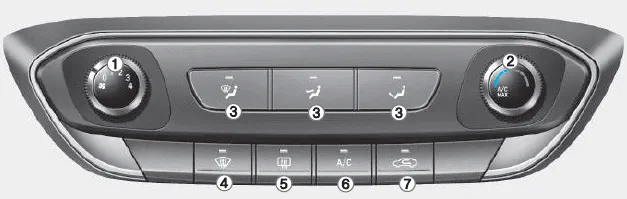
â– Type A
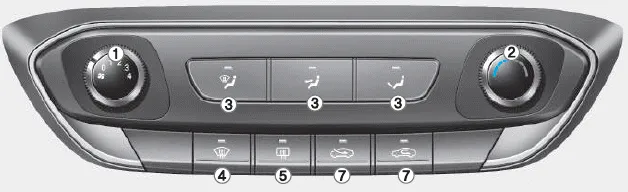
â– Type B
1. Fan speed control knob
2. Temperature control knob
3. Mode selection buttons
4. Front windscreen defroster button
5. Rear window defroster button
6. A/C (Air conditioning) button*
7. Air intake control button
NOTICE To prevent damage to the conductors bonded to the inside surface of the rear window, never use sharp instruments or window cleaners containing abrasives to clean the window.
1. Start the engine. 2. Set the mode to the desired position. To improve the effectiveness of heating and cooling, select: - Heating: - Cooling: 3.
Other information:
Hyundai i30 (PD) 2018-2024 Owner's Manual: Snow tyres
WARNING Snow tyres should be equivalent in size and type to the vehicle's standard tyres. Otherwise, the safety and handling of your vehicle may be adversely affected. We recommend you use snow tyres when road temperature is below 45°F (7°C).
Hyundai i30 (PD) 2018-2024 Owner's Manual: Light bulbs
Consult a HYUNDAI authorised repairer to replace most vehicle light bulbs. It is difficult to replace vehicle light bulbs because other parts of the vehicle must be removed before you can get to the bulb. This is especially true for removing the headlamp assembly to get to the bulb(s).
Categories
- Manuals Home
- Hyundai i30 Owners Manual
- Fuses
- Scheduled maintenance services
- LKA system operation
- New on site
- Most important about car
