
Hyundai i30 (PD): Interior features / Cargo security screen (wagon)
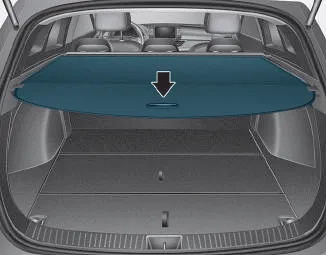
Use the cargo security screen to hide items stored in the cargo area.
NOTICE
Since the cargo security screen may be damaged or malformed, do not put luggage on it when it is used.
WARNING
- Do not place objects on the cargo security screen. Such objects may be thrown about inside the vehicle and possibly injure vehicle occupants during an accident or when braking.
- Never allow anyone to ride in the luggage compartment. It is designed for luggage only.
- Maintain the balance of the vehicle and locate the weight as forward as possible.
To use the cargo security screen
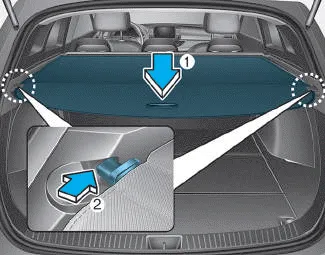
1. Pull the cargo security screen towards the rear of the vehicle by the handle (1).
2. Insert the guide pin into the guide (2).
NOTICE
Pull out the cargo security screen with the handle in the centre to prevent the guide pin from falling out of the guide.
When the cargo security screen is not in use:
1. Pull the cargo security screen back and down to release it from the guides.
2. The cargo security screen will automatically slide back in.
NOTICE
The cargo security screen may not automatically slide back in if it is not fully pulled out. Pull it out completely before letting it go.
To remove the cargo security screen
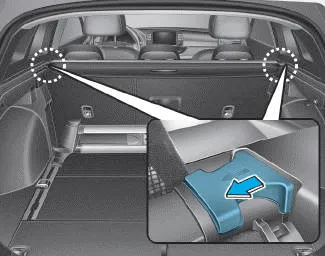
1. Push in the guide pin.
2. Whilst pushing the guide pin, pull out the cargo security screen.
Your vehicle is equipped with a barrier net. When you load some cargoes on the rear seat or rear cargo area, you must install the barrier net behind front or rear seatback.
The luggage rail system may help prevent the luggage from rolling around in the luggage compartment. Build in segmentation bar Put both pillars (A) of the segmentation bar on the rail openings.
Other information:
Hyundai i30 (PD) 2018-2024 Owner's Manual: Jack label
The actual Jack label in the vehicle may differ from the illustration. For more detailed specifications, refer to the label attached to the jack. 1. Model Name 2. Maximum allowable load 3. When using the jack, set your parking brake. 4. When using the jack, stop the engine.
Hyundai i30 (PD) 2018-2024 Owner's Manual: Specifications & Consumer information
Dimensions, Engine, Bulb wattage Dimensions *1 : with roof rack *2 : with outside mirror Engine Bulb wattage *1 : Fastback *2 : Fastback (N Line) Tyres and wheels Full size tyre *1 : In order to drive at high speed(over 100mph or 160km/h) where the speed is lega, adjust tyre pressure as shown in above table.
Categories
- Manuals Home
- Hyundai i30 Owners Manual
- Warning and indicator lights
- LKA system operation
- Specifications & Consumer information
- New on site
- Most important about car
