
Hyundai i30 (PD): Blind-spot collision warning (BCW) system / Detecting sensor
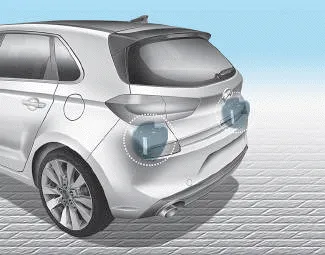
The sensors are located inside the rear bumper.
Always keep the rear bumper clean for proper operation of the system.
Warning message
BCW (Blind-Spot Collision Warning) system disabled.

Radar blocked
• This warning message may appear when :
- One or both of the sensors on the
rear bumper is blocked by dirt or
snow or a foreign object.
- Driving in rural areas where the
BCW sensor does not detect
another vehicle for an extended
period of time.
- When there is inclement weather
such as heavy snow or rain.
- A trailer or carrier is installed. To
use the BCW system, remove the
trailer or carrier from your vehicle.
If any of these conditions occur, the light on the BCW switch and the system will turn off automatically.
When the BCW cancelled warning message is displayed in the cluster, check to make sure that the rear bumper is free from any dirt or snow in the areas where the sensor is located. Remove any dirt, snow, or foreign material that could interfere with the radar sensors.
After any dirt or debris is removed, the BCW system should operate normally after about 10 minutes of driving the vehicle.
If the system still does not operate normally have your vehicle inspected by a HYUNDAI authorised repairer.
Information
Turn off the system by pressing the BCW switch and deselecting Rear Cross-Traffic Collision warning (RCCW) from the User Settings mode on the cluster, when using a trailer or carrier behind your vehicle.
Check BCW (Blind- spot Collision Warning) system
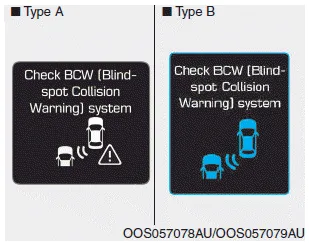
If there is a problem with the BCW system, a warning message will appear and the light on the switch will turn off. The system will turn off automatically. We recommend that you have your vehicle inspected by a HYUNDAI authorised repairer.
The Rear Cross-Traffic Collision warning function monitors approaching cross traffic from the left and right side of the vehicle when your vehicle is in reverse.
The driver must be cautious in the below situations, because the system may not detect other vehicles or objects in certain circumstances. The vehicle drives on a curved road or through a tollgate.
Other information:
Hyundai i30 (PD) 2018-2024 Owner's Manual: Washer fluid
Checking the washer fluid level Check the fluid level in the washer fluid reservoir and add fluid if necessary. Plain water may be used if washer fluid is not available. However, use washer solvent with antifreeze characteristics in cold climates to prevent freezing.
Hyundai i30 (PD) 2018-2024 Owner's Manual: Check tyre inflation pressure
Check your tyres, including the spare tyre, once a month or more. How to check Use a good quality tyre pressure gauge to check tyre pressure. You can not tell if your tyres are properly inflated simply by looking at them. Radial tyres may look properly inflated when they are under-inflated.
Categories
- Manuals Home
- Hyundai i30 Owners Manual
- Specifications & Consumer information
- Warning and indicator lights
- Drive mode integrated control system
- New on site
- Most important about car
