
Hyundai i30 (PD): Convenient features of your vehicle / Manual climate control system
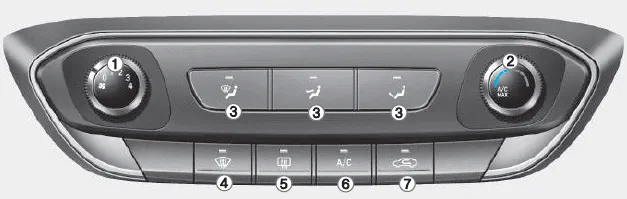
â– Type A
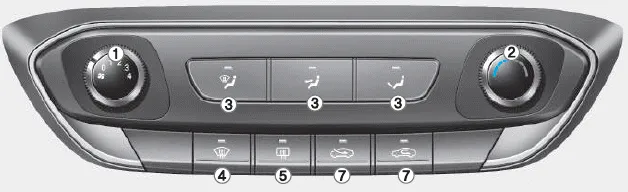
â– Type B
1. Fan speed control knob
2. Temperature control knob
3. Mode selection buttons
4. Front windscreen defroster button
5. Rear window defroster button
6. A/C (Air conditioning) button*
7. Air intake control button
NOTICE To prevent damage to the conductors bonded to the inside surface of the rear window, never use sharp instruments or window cleaners containing abrasives to clean the window.
1. Start the engine. 2. Set the mode to the desired position. To improve the effectiveness of heating and cooling, select: - Heating: - Cooling: 3.
Other information:
Hyundai i30 (PD) 2018-2024 Owner's Manual: Special driving conditions
Hazardous driving conditions When hazardous driving elements are encountered such as water, snow, ice, mud and sand, take the following precautions: Drive cautiously and maintain a longer braking distance. Avoid abrupt braking or steering.
Hyundai i30 (PD) 2018-2024 Owner's Manual: If you have a flat tyre (with tyre mobility kit)
â– Type A â– Type B For safe operation, carefully read and follow the instructions in this manual before use. (1) Compressor (2) Sealant bottle The Tyre Mobility Kit is a temporary fix to the tyre and we recommend that the system be inspected by a HYUNDAI authorised repairer.
Categories
- Manuals Home
- Hyundai i30 Owners Manual
- Speed Limiter Indicator Light. SPORT Mode Indicator Light. ECO Mode Indicator Light
- Exhaust System (DPF) Warning Light. Glow Indicator Light
- Fuses
- New on site
- Most important about car
