
Hyundai i30 (PD): Lighting / Exterior lights
Lighting control
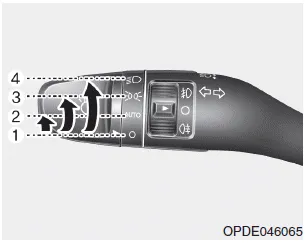
To operate the lights, turn the knob at the end of the control lever to one of the following positions:
(1) O (OFF) position
(2) AUTO light position (if equipped)
(3) Position lamp position
(4) Headlamp position
AUTO light position
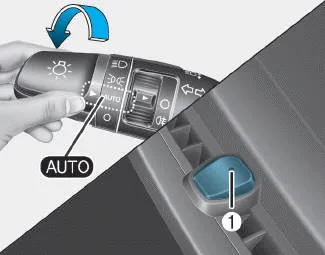
When the light switch is in the AUTO position, the position lamp and headlamp will be turned ON or OFF automatically depending on the amount of light outside the vehicle.
Even with the AUTO light feature in operation, it is recommended to manually turn ON the lamps when driving at night or in a fog, or when you enter dark areas, such as tunnels and parking facilities.
NOTICE
- Do not cover or spill anything on the sensor (1) located on the instrument panel.
- Do not clean the sensor using a window cleaner, the cleanser may leave a light film which could interfere with sensor operation.
- If your vehicle has window tint or other types of metallic coating on the front windscreen, the AUTO light system may not work properly.
Position lamp position ( )
)
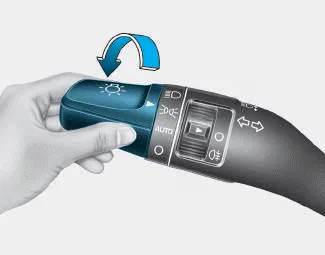
The position lamp, license plate lamp and instrument panel lamp are turned ON.
Headlamp position ( )
)

The headlamp, position lamp, license plate lamp and instrument panel lamp are turned ON.
Information
The ignition switch must be in the ON position to turn on the headlamp.
- High beam operation
- High Beam Assist (HBA)
- Warning light and message
- Turn signals and lane change signals
- Front fog lamp
- Rear fog lamp
- Battery saver function, Headlamp delay function
- Daytime running light (DRL), Headlamp levelling device
To turn on the high beam headlamp, push the lever away from you. The lever will return to its original position. The high beam indicator will light when the headlamp high beams are switched on.
Other information:
Hyundai i30 (PD) 2018-2024 Owner's Manual: Owner maintenance. Owner maintenance schedule
WARNING Performing maintenance work on a vehicle can be dangerous. If you lack sufficient knowledge and experience or the proper tools and equipment to do the work, we recommend that the system be serviced by a HYUNDAI authorised repairer.
Hyundai i30 (PD) 2018-2024 Owner's Manual: Headlamp and front fog lamp aiming
Headlamp aiming 1. Inflate the tyres to the specified pressure and remove any loads from the vehicle except the driver, spare tyre, and tools. 2. The vehicle should be placed on a flat floor. 3. Draw vertical lines (Vertical lines passing through respective head lamp centres) and a horizontal line (Horizontal line passing through
Categories
- Manuals Home
- Hyundai i30 Owners Manual
- Drive mode integrated control system
- Trip computer
- Light bulbs
- New on site
- Most important about car
