
Hyundai i30 (PD): Exterior lights / Turn signals and lane change signals
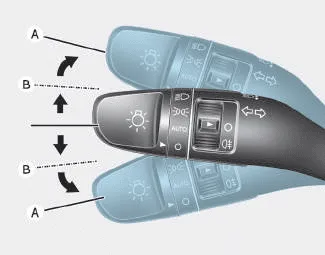
To signal a turn, push down on the lever for a left turn or up for a right turn in position (A). To signal a lane change, move the turn signal lever slightly and hold it in position (B).The lever will return to the OFF position when released or when the turn is completed.
If an indicator stays on and does not flash or if it flashes abnormally, one of the turn signal bulbs may be burned out and will require replacement.
One-touch turn signal function
To activate a one-touch turn signal function, move the turn signal lever slightly and then release it. The lane change signals will blink 3, 5 or 7 times.
You can activate/deactivate the One Touch Turn Signal function or choose the number of blinks (3, 5, or 7) from the User Settings mode on the LCD display.
When the High Beam Assist (HBA) System is not working properly, the warning message will come on for a few second. After the message disappears, the master warning light () will illuminate.
Fog lamps are used to provide improved visibility when visibility is poor due to fog, rain or snow, etc. Use the switch next to the headlamp switch to turn the fog lamps ON and OFF.
Other information:
Hyundai i30 (PD) 2018-2024 Owner's Manual: Climate control air filter
Filter inspection If the vehicle is operated in the severely air-polluted cities or on dusty rough roads for a long period, it should be inspected more frequently and replaced earlier. When you, the owner, replace the climate control air filter, replace it performing the following procedure, and be careful to avoid damaging other c
Hyundai i30 (PD) 2018-2024 Owner's Manual: Front fog lamp
â– Type A â– Type B 1. Loosen the pin-type retainers of the under cover and then remove the undercover. 2. Reach your hand into the back of the front bumper. 3. Disconnect the power connector from the socket. 4. Remove the bulb-socket from the housing by turning the socket counterclockwise until the tabs on the socket align
Categories
- Manuals Home
- Hyundai i30 Owners Manual
- Engine oil
- Headlamp, static bending lamp, position lamp, turn signal lamp and daytime running light bulb replacement
- Speed Limiter Indicator Light. SPORT Mode Indicator Light. ECO Mode Indicator Light
- New on site
- Most important about car
