
Hyundai i30 (PD): Forward collision-avoidance assist (FCA) system - sensor fusion type (front radar + front camera) / FCA sensor
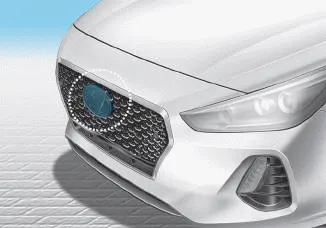
â– Front radar
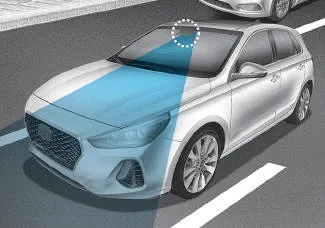
â– Front camera
In order for the FCA system to operate properly, always make sure the sensor cover or sensor is clean and free of dirt, snow, and debris. Dirt, snow, or foreign substances on the sensor cover or sensor may adversely affect the sensing performance of the sensor.
NOTICE
- Do not apply license plate molding or foreign objects such as a bumper sticker or a bumper guard near the radar sensor. Doing so may adversely affect the sensing performance of the radar.
- Always keep the radar sensor and cover clean and free of dirt and debris.
- Use only a soft cloth to wash the vehicle. Do not spray pressurized water directly on the sensor or sensor cover.
- Be careful not to apply unnecessary force on the radar sensor or sensor cover. If the sensor is forcibly moved out of proper alignment, the FCA system may not operate correctly. In this case, a warning message may not be displayed. Have the vehicle inspected by a HYUNDAI authorised repairer.
- If the front bumper becomes damaged in the area around the radar sensor, the FCA system may not operate properly. We recommend that you have the vehicle inspected by a HYUNDAI authorised repairer.
- Use only genuine parts to repair or replace a damaged sensor or sensor cover. Do not apply paint to the sensor cover.
NOTICE
- NEVER install any accessories or stickers on the front windscreen, nor tint the front windscreen.
- NEVER locate any reflective objects (i.e. white paper, mirror) over the dashboard. Any light reflection may cause a malfunction of the system.
- Pay extreme caution to keep the camera out of water.
- NEVER arbitrarily disassemble the camera assembly, nor apply any impact on the camera assembly.
- Playing the vehicle audio system at high volume may offset the system warning sounds.
Information
We recommend that you have the system checked by a HYUNDAI authorised repairer when:
- The windscreen glass is replaced.
- The radar sensor or cover gets damaged or replaced.
Warning message and warning light
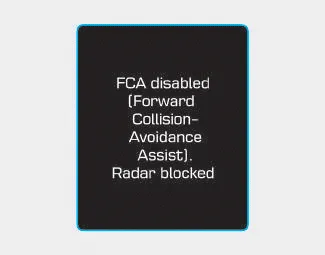
FCA disabled (Forward Collision- Avoidance Assist). Radar blocked
When the sensor cover is blocked with dirt, snow, or debris, the FCA system operation may stop temporarily. If this occurs, a warning message will appear on the LCD disi play.
Remove any dirt, snow, or debris and clean the radar sensor cover before operating the FCA system. The system will operate normally when such dirt, snow or debris is removed.
The FCA may not properly operate in an area (e.g. open terrain), where any substances are not detected after turning ON the engine.
The FCA produces warning messages and warning alarms in accordance with the collision risk levels, such as abrupt stopping of the vehicle in front, insufficient braking distance, or pedestrian detection.
Check FCA (Forward Collision Avoidance Asst.) When the FCA is not working properly, the FCA warning light () will illuminate and the warning message will appear for a few seconds.
Other information:
Hyundai i30 (PD) 2018-2024 Owner's Manual: Maintenance when towing a trailer
Your vehicle will need service more often when you regularly pull a trailer. Important items to pay particular attention to include engine oil, automatic transmission fluid, axle lubricant and cooling system fluid. Brake condition is another important item to frequently check.
Hyundai i30 (PD) 2018-2024 Owner's Manual: If you have a flat tyre (with tyre mobility kit)
â– Type A â– Type B For safe operation, carefully read and follow the instructions in this manual before use. (1) Compressor (2) Sealant bottle The Tyre Mobility Kit is a temporary fix to the tyre and we recommend that the system be inspected by a HYUNDAI authorised repairer.
Categories
- Manuals Home
- Hyundai i30 Owners Manual
- Fuses
- Low tyre pressure telltale
- Battery replacement
- New on site
- Most important about car
